
LinkedIn Sales Navigator
LinkedInBusiness
4.3302.00 Reviews
- Version
- 6.29.60
- Installs
- 1.00M
- Age Rating
- Everyone
Screenshots
Our Review of LinkedIn Sales Navigator
 Analysis by Appyee
Finding the right person at a company can eat up more time than the conversation itself. I’ve often found that the hard part of prospecting isn’t sending a message; it’s sorting through broad search results, checking whether a contact fits, and remembering why I wanted to follow up. LinkedIn Sales Navigator is built around that problem. It gives sales-focused users a more targeted way to find and keep track of professional contacts, though it works best when you already have a clear idea of whom you want to reach.
Where it can save time—and where it cannot
The practical benefit is less aimless searching, not automatic sales success. Better filters can help me narrow a large pool of people to a smaller group worth researching, while saved leads and updates can make it easier to return to those prospects later. That can reduce the little bits of admin that accumulate across a working week. It cannot decide whether a person is a good fit, write a thoughtful message for me, or make a cold approach welcome. I still need to check the context and use good judgment.
That distinction matters when deciding whether to use a dedicated sales tool or stick with ordinary networking. If I only need to look up a person now and then, a basic LinkedIn search may be enough. If I regularly identify prospects, revisit them, and coordinate outreach, a more sales-oriented workflow can be useful. The app is most compelling when those tasks happen often enough that a focused search and a place to keep track of leads are worth adding to my routine.
Getting Started with LinkedIn Sales Navigator
First off, let's talk about setting it up. If you already have a LinkedIn account, you're halfway there. The app integrates seamlessly with your existing profile, so no need to start from scratch. It's available for both Android and iOS, which is a win-win in my book.
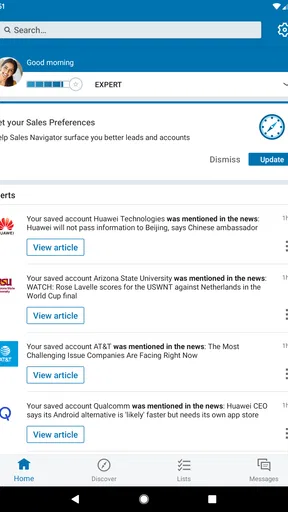
Once you're in, the dashboard is pretty intuitive. You can tell they've put some thought into making it user-friendly, which I appreciate because who has time to fumble around with complicated interfaces?
Make the first search specific
For a useful first session, I’d start with a single real prospecting task rather than trying to build an elaborate system immediately. Pick a company type, role, or industry you genuinely serve, then use the search filters to narrow the field. Search works better when I can explain the target in plain language: for example, a particular kind of decision-maker at businesses that match the customers I already understand. If I cannot describe the target clearly, adding more filters is unlikely to solve the underlying problem.
I’d also treat the first results as a research shortlist, not a ready-made call list. A job title can sound relevant while the person’s responsibilities are different from what I need, and a strong-looking profile is not proof of buying intent. Opening a few results and checking their company context helps me judge whether my filters are doing useful work. If the list is too narrow, loosen one filter at a time; if it is too broad, tighten the condition that matters most. That simple habit makes it easier to tell which search choices are helping.
Features That Stand Out
So, what makes LinkedIn Sales Navigator worth your time? Let me break it down:
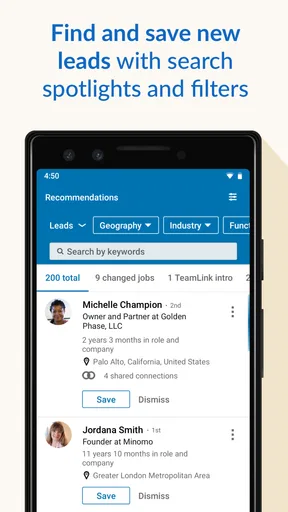
- Advanced Search Filters: This is where you can really dig deep. Filter by industry, company size, or even specific job titles. It’s like having a personalized Rolodex at your fingertips.
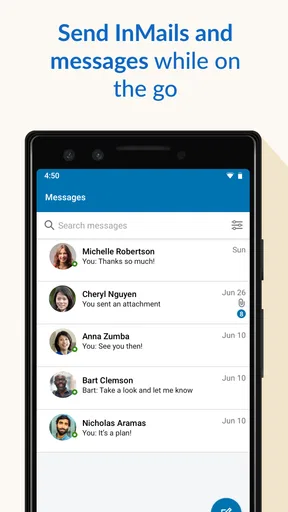
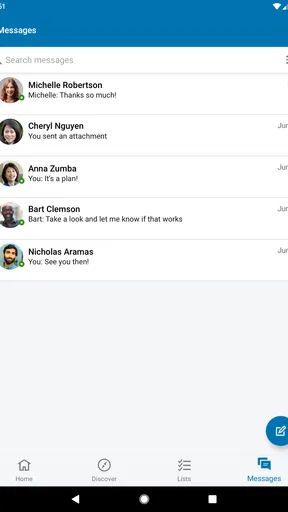
- InMail Messages: Bypassing gatekeepers has never been easier. With InMail, you can reach out directly to potential leads even if you're not connected. It's like having a backstage pass to networking events.
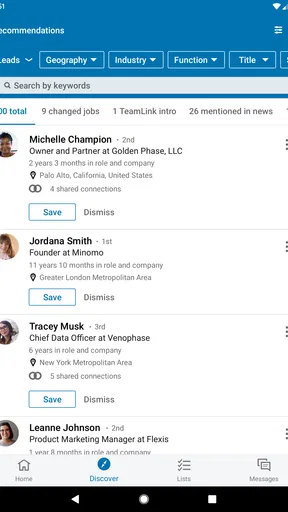
- Lead Recommendations: Not sure who to target next? The app gives you tailored suggestions based on your preferences and activity. It's like having a personal sales assistant whispering in your ear.
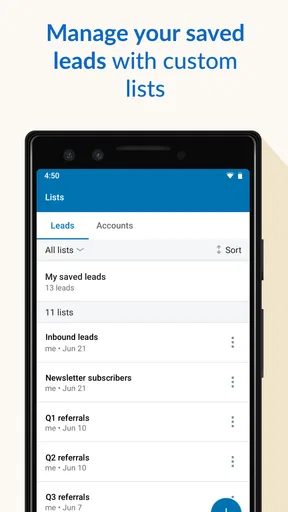
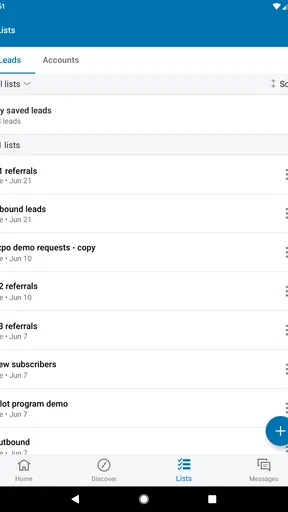
Those tools work best together, but I wouldn’t rely on recommendations as a substitute for a target plan. They are a way to discover people I might otherwise overlook; the fit still needs checking. One useful habit is to save a small, clearly defined group of promising leads and revisit it with a reason in mind, such as preparing for relevant outreach. That is more manageable than collecting profiles without a next step, which can make any prospecting tool feel like another inbox.
For a first message, I’d use the profile as a prompt for research rather than as a template to copy. A role change, shared professional context, or company development may give me a relevant opening, but only if I can connect it honestly to the reason for reaching out. InMail can make direct contact possible; it does not remove the need to be concise, specific, and respectful. I would rather send fewer messages that make sense than treat access as a reason to contact everyone in a search.
Integration and Workflow
One of the coolest things is how LinkedIn Sales Navigator integrates with CRM systems. If you're using tools like Salesforce or Microsoft Dynamics, you can sync data seamlessly. This means no more manual data entry, which is a huge time-saver.
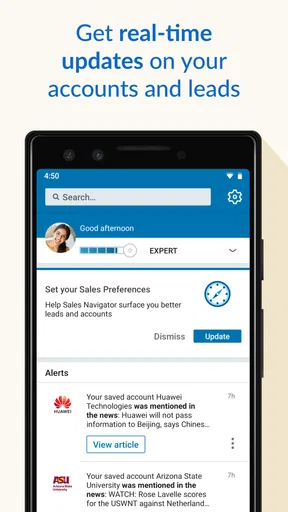
The app also offers insights and updates on your saved leads. Imagine getting real-time updates about job changes or shared content from your prospects. It’s like having a crystal ball for your sales strategy.
In practice, a useful division of labor is to use the mobile app for quick research and follow-up decisions, then handle detailed record keeping in the system your team already uses. A prospect update can tell me that a contact’s situation may have changed; it does not tell me what to do next. I’d check whether the update is relevant, decide if there is a natural reason to reconnect, and then record the next step in the appropriate place. This keeps an interesting notification from turning into an unplanned burst of outreach.
CRM syncing can be valuable for teams, but it also makes setup choices more consequential. Before relying on a connection, I’d agree with colleagues on what belongs in the CRM and how leads should be handled there. Otherwise, syncing can move information into a workflow without solving the team’s underlying confusion about ownership or follow-up. For an individual who does not use a CRM, this benefit may matter much less; the app’s search and lead-tracking tools are the more relevant parts of the decision.
Personal Experience
Now, let’s get a bit personal. I tried using the app to connect with some leads in the tech industry. The advanced search filters were a game changer. I found the right contacts within minutes, something that would have taken ages with a basic LinkedIn search.
The InMail feature was another highlight. I reached out to five potential leads and got three responses back. Not too shabby if you ask me. It felt like I was cutting through the noise and getting straight to the decision-makers.
A realistic day-to-day use is less dramatic than a sudden string of replies. I might have a short break before a call, check a saved contact’s company and role, notice a relevant change, and decide whether it gives me a genuine reason to follow up. If it does, I can prepare a more informed conversation; if it does not, I can leave the person alone and move on. That small decision loop is where I see the app helping most: it supports preparation without pretending to replace it.
For someone managing several accounts, the same approach can help keep research tied to actual work. I’d group attention around a few target companies or types of contact, then revisit the leads when there is a concrete sales reason. The trade-off is that maintaining a useful shortlist still takes discipline. Saving every plausible profile creates clutter, while saving only a handful without reviewing them makes the tool little more than a collection of bookmarks. A clear next action is what turns a saved lead into something useful.
Who benefits most from a dedicated sales app
I can see the strongest fit for people whose jobs involve repeated prospect research: sales representatives, business development staff, and others who need to identify relevant professional contacts as part of regular outreach. It can also help a small team that wants a shared, more deliberate process for finding prospects, especially if its CRM workflow is already established. The value is less about having another way to browse profiles and more about making targeted discovery part of a repeatable routine.
I would not recommend choosing it just because networking feels difficult. A freelancer who needs only occasional introductions, a job seeker focused on applications, or someone who mainly wants to keep in touch with existing contacts may be better served by regular LinkedIn use and a simple personal follow-up system. Likewise, if a person’s work depends on local walk-in relationships or referrals rather than finding prospects through professional profiles, this app may add little. The right question is not whether its tools sound impressive; it is whether they address a recurring task I actually have.
Cost, compatibility, and everyday trade-offs
The app is free to install, but in-app purchases range from around eighty dollars to around one hundred twenty dollars per item. That is a meaningful commitment for an individual, so I’d first consider how often I prospect and whether the focused workflow would save enough effort to justify paying for it. Someone evaluating it should check the current options in the app before making a budget decision, rather than assuming that installing it means every sales feature is free. For casual use, the cost may be hard to justify; for work where prospecting is central, the calculation can be different.
LinkedIn develops the business app, which has a 4.3 average from around ten thousand ratings and over one million installs. It is rated for Everyone, and the current version is 6.29.56. The release history goes back to May 30, 2015, and it requires iOS or Android version 8.0 or later. Those details make it worth checking device compatibility before installing, particularly if you use an older phone or keep operating systems unchanged for a long time.
Compared with ordinary LinkedIn browsing, Sales Navigator is the more purpose-built choice when the job is to narrow prospects and keep them in view. Compared with a CRM, it serves a different role: a CRM is where a team may organize customer records and its sales process, while this app helps with professional discovery and lead-focused research. Neither replaces the other for everyone. If I already have a reliable source of prospects and only need to manage conversations, my CRM may be enough; if finding suitable people is the bottleneck, Sales Navigator is the more relevant tool to test.
Final Thoughts
So, is LinkedIn Sales Navigator the ultimate sales tool? Well, it certainly packs a punch. With its advanced search capabilities, direct messaging, and seamless CRM integration, it’s a powerhouse for anyone serious about networking and sales.
Sure, it might take a little investment to get the most out of it, but if you're in the business of building relationships and closing deals, it's worth considering. Whether you're a seasoned salesperson or just getting started, it’s a tool that can elevate your game.
So go ahead, give it a try, and see how it fits into your digital toolkit. Who knows, it might just be the edge you need to ace your sales targets.
My verdict is positive, with a clear condition: use it when targeted prospect discovery is a regular part of your work, and judge it by whether it helps you spend less time searching and more time preparing useful conversations. I would start with one narrow search, save only leads I can explain, and check whether the resulting routine fits my existing CRM habits before committing to a paid option. That gives me a practical way to evaluate the app without confusing a longer contact list with better sales work.
Ultimately, the app is not a shortcut around trust or relevance. Its strongest contribution is organizing discovery and keeping useful professional context closer at hand. If that is the recurring friction in your sales process, it is worth considering; if your need is occasional networking, ordinary LinkedIn and a lighter follow-up method may be simpler.
Verdict
Strengths of LinkedIn Sales Navigator
- Comprehensive lead recommendations.
- Advanced search filters enhance precision.
- Integrates well with CRM tools.
- Real-time updates on lead activities.
- Customizable alerts for key changes.
Limitations of LinkedIn Sales Navigator
- High subscription cost for premium features.
- Complex interface for new users.
- Limited offline functionality.
- Requires constant internet connection.
- Limited customization in reporting.
Other Releases by LinkedIn
View All
LinkedIn: Community & Network
Business3.8

LinkedIn Learning
Education4.8
Similar Picks in This Category
View AllLinkedIn: Community & Network
LinkedIn3.8

Zoom Workplace
zoom.com4.1

Microsoft Teams
Microsoft Corporation4.6

Meta Business Suite
Meta Platforms, Inc.4.6

Webex Meetings
Cisco Systems, Inc.4.5

TeamViewer Remote Control
TeamViewer4.4
Frequently Asked Questions
What is LinkedIn Sales Navigator, and how can it benefit sales professionals?
LinkedIn Sales Navigator is a premium tool designed to help sales professionals find, connect, and build relationships with potential clients. It offers advanced search capabilities, lead recommendations, and personalized outreach options. By leveraging LinkedIn's vast network, users can identify key decision-makers, track prospects, and ultimately enhance their sales strategy.
What are the key features of LinkedIn Sales Navigator?
LinkedIn Sales Navigator includes features such as advanced lead and company search filters, CRM integration, real-time insights on leads and accounts, and personalized lead recommendations. It also offers InMail messaging to reach prospects directly, even if you're not connected, and the ability to save leads and accounts for easy tracking.
Is LinkedIn Sales Navigator suitable for small businesses or individual sales professionals?
Yes, LinkedIn Sales Navigator is suitable for both small businesses and individual sales professionals. Its flexible pricing plans cater to different needs, and the tool provides valuable insights and connections regardless of company size. Its features are designed to improve efficiency and effectiveness in identifying and engaging with potential clients.
How does LinkedIn Sales Navigator integrate with existing CRM systems?
LinkedIn Sales Navigator integrates with popular CRM systems like Salesforce and Microsoft Dynamics, allowing seamless data transfer and management. This integration helps users keep track of their interactions, updates, and notes within their CRM, ensuring a unified approach to sales management and improving overall sales productivity.
What are the pricing options for LinkedIn Sales Navigator, and is there a free trial available?
LinkedIn Sales Navigator offers several pricing tiers to suit different needs, including Professional, Team, and Enterprise plans. Each plan varies in features and the number of InMail messages you can send. LinkedIn typically offers a free trial for new users, allowing them to explore the features and assess the tool's value before committing to a subscription.
